Depending where you live, who you are and what skills you have, you might have found that landing a job is a bit more complicated than it used to be and requires skills, patience and time.
I am currently unemployed and as I didn’t land a new job immediately like I used to do, I am now starting to take job hunting a bit more seriously. On this and in the followup blog posts I sketch a few job hunting processes and look for tools that support them. I am also going to talk a lot about AI related tools.
Main flow dissected
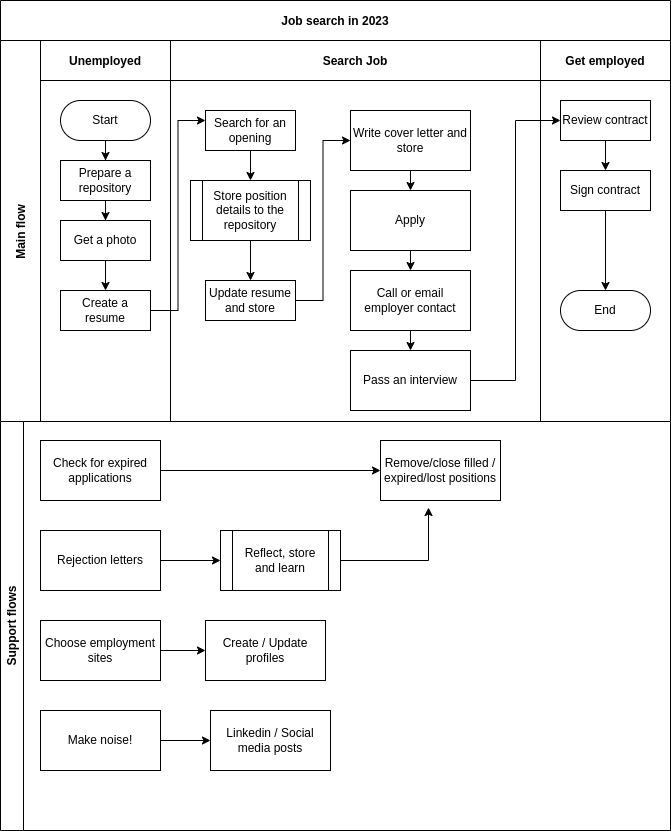
This is a rudimentary walk through and I will return to this flow later in detail.
- Prepare a repository, many of us who have background working with office tools such as Google Sheets or Microsoft Excel will immediately think of storing searches on a spreadsheet. A spreadsheet would have rows for openings and columns for details like job title, dates, contact details and links for files containing job announcements, resume and cover letter. There would be columns for status, next task date and task regarding the job application. The spreadsheet would be sorted by status and next task date. But there must be better ways for doing this with automated notifications and tracking included and there are.
- Get a photo, if you can afford it, get a photo by a professional. Shower, dress in clean and neat clothes that you like to wear. Make sure your hair is done and apply makeup. Look on level to the camera and smile. If you can’t have a professional, at least make sure the background is neutral and there are no shadows covering your face. Get several different photos on some lossless format – png is something that most of the software tools you might already have will support.
- Create a resume, there are lots of templates for word processing software and publishing software. There are lots of sites that offer you resume building, one of the most popular is Canva.
- Search for an opening, there are lots and lots of sites for job openings. One of the most popular ones today is Linkedin.
- Store position details to the repository, if you use the spreadsheet, this means adding a row for the opening and filling the details. You should take a pdf-print for the job announcement and store it on the disk. Google Drive is a good place which you can reach with your phone from everywhere. Make a new subfolder for every position. Pdf-print is better than a link, sometimes the employer removes the job announcement from the web, when they start the interviews to avoid people inquiring late.
- Update resume, if you have the tools – Canva is free for a while but requires paid subscription later – to update your resume, then tweak it to highlight experience and skills you have that match the position. Store the updated resume to the folder where you printed the pdf-version of the job announcement.
- Write a cover letter, use some proofreading word processing software to write it. Again Google Docs is a good choice, you can write it to the same folder where you stored the job announcement.
- Apply, remember to set a task to contact the employer representative either by her email or by phone.
- Pass an interview, prepare by googling the company, reading again the job announcement, your updated resume and cover letter.
- Review the contract, google the job description and compare salary and other terms against what you found. If they seem to be on the par then sign the contract.
Support flows dissected
Again this is the first look on the flows.
- Check for expired applications, a good recruitment process keeps you informed. Sadly, most of them are not good ones and they don’t return to you. You have to inquire by phone or email to find the status or just close them if the time has run out.
- Mark expired / closed / rejected positions done, after a while your ”spreadsheet” will have tens of rows and you should sort irrelevant rows to the bottom or remove them completely.
- Rejection letters, read the letter and see if they gave any reasons for the rejection. Some offer the option to ask for details and sometimes it is worth doing that.
- Reflect, store and learn, store the rejection letter to the same subfolder. Go through the announcement, your resume and cover letter and reflect.
- Choose employment sites, almost every country has an official employment site and some popular local commercial ones. Then there are recruiting companies and global sites like Linkedin. Make a list for those you are prepared to have a presence.
- Create / update profiles, create or update your profiles on those sites you chose. You will need your general resume and your photos to do that.
- Make noise, humans are social creatures. You know people from various connections and those people know people. There is a popular six degrees of separation idea that you are six connections away from every other person on this planet. Someone has a job for you if they just knew that you are seeking one. Make a list of social media where you have profiles and think which ones could help you get a job.
- Social media / linkedin posts, writing skill, talent or positive attitude posts on sites while hinting that you can be hired, could help.
 Fuula-täti